

🛠 Functionality and Use Cases
Subflow nodes are suitable for the following typical scenarios:- Reusing logic that appears repeatedly across multiple workflows, such as employee onboarding initialization, invoice approval, or troubleshooting.
- Breaking down complex logic into clear, modular components to keep the main workflow concise.
- Independently developing, testing, and maintaining specific workflow logic, reducing risks associated with changes to the main workflow.
🧷 Example: Subflow Node in Employee Onboarding Workflow
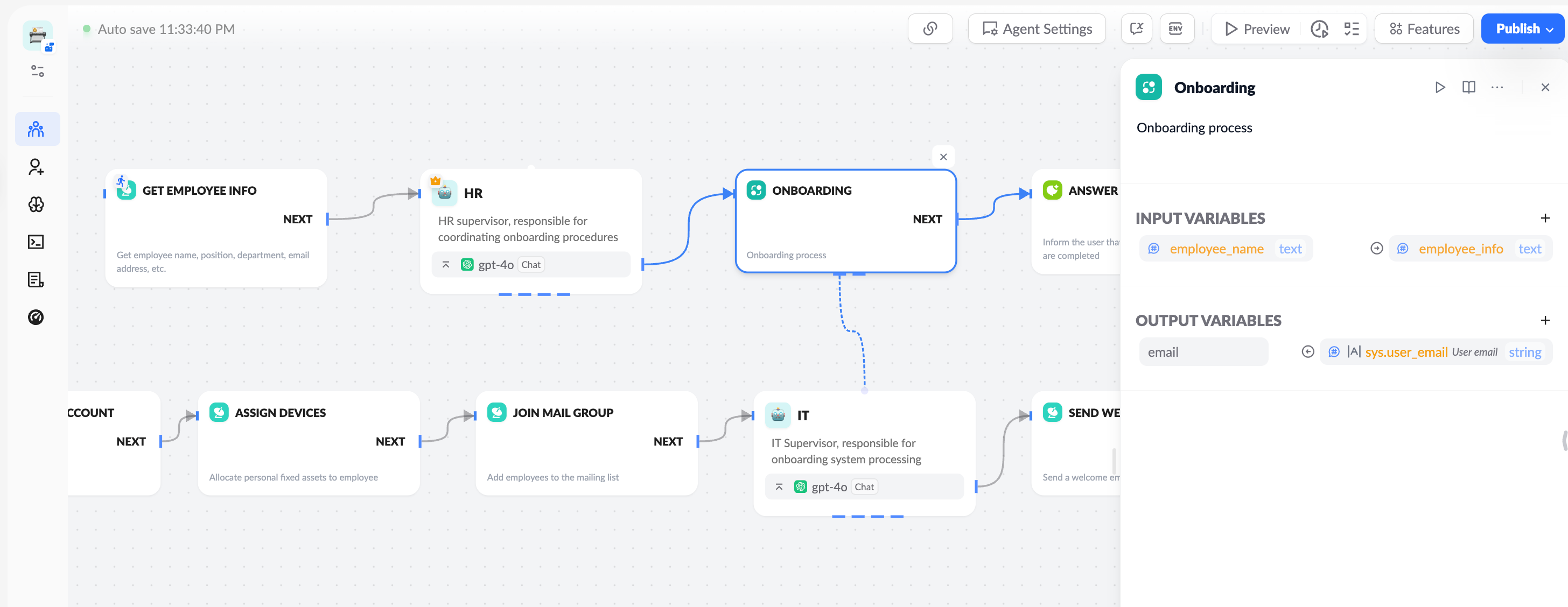
In a company’s “Employee Onboarding Automation Workflow,” a subflow node named [Onboarding Process] encapsulates the following IT initialization operations:- Creating an enterprise email for the employee.
- Assigning office equipment.
- Adding the employee to the department email group.
- Sending a welcome email.
🧬 Node Capabilities
The Subflow node supports parameter passing between the main workflow and the subflow, categorized into Input Variables and Output Variables, as described below:
🔸 Input Variables
Used to pass data from the main workflow to the subflow. As shown, the configuration format is:
This indicates that the
employee_info variable from the main workflow is passed to the subflow and assigned to the employee_name variable.
🔸 Output Variables
Used to return processing results from the subflow to the main workflow. The configuration format is:
This indicates that the
sys.user_email variable from the subflow is output to the email variable in the main workflow, available for subsequent nodes, such as subflow_jzsikojwdp_channel.email corresponding to the email output variable of the “Subflow” node.
✅ Operation Tips:
- Multiple mapping entries can be added by clicking the
➕button. - Subflow variable sources are typically system variables or intermediate computation results within the subflow.
⚙ Usage Guidelines
How to Create a Subflow Node?
- Add a new subflow node and name it (e.g., “Onboarding Process Subflow”).
- Add an agent node as the entry point to the subflow.
- Add more nodes to the workflow associated with the agent node.
- Configure input and output parameter mappings.
🚀 Application Value
- ✅ Increases workflow reuse, avoiding redundant development.
- ✅ Reduces main workflow complexity, improving readability.
- ✅ Supports division of workflow responsibilities, facilitating multi-team collaboration.
- ✅ Enhances workflow maintainability and scalability.