

Build and customize an embeddable chat experience with ChatKit.
Overview
Embed ChatKit in your frontend, customize the look and feel, and let users connect to backends hosted and extended through XpertAI Agent Builder. A dev server is required.Getting Started with ChatKit
Embedding ChatKit in Your Frontend
At a high level, setup takes three steps: create an agent workflow hosted on XpertAI servers, configure ChatKit, and add capabilities to craft your chat experience.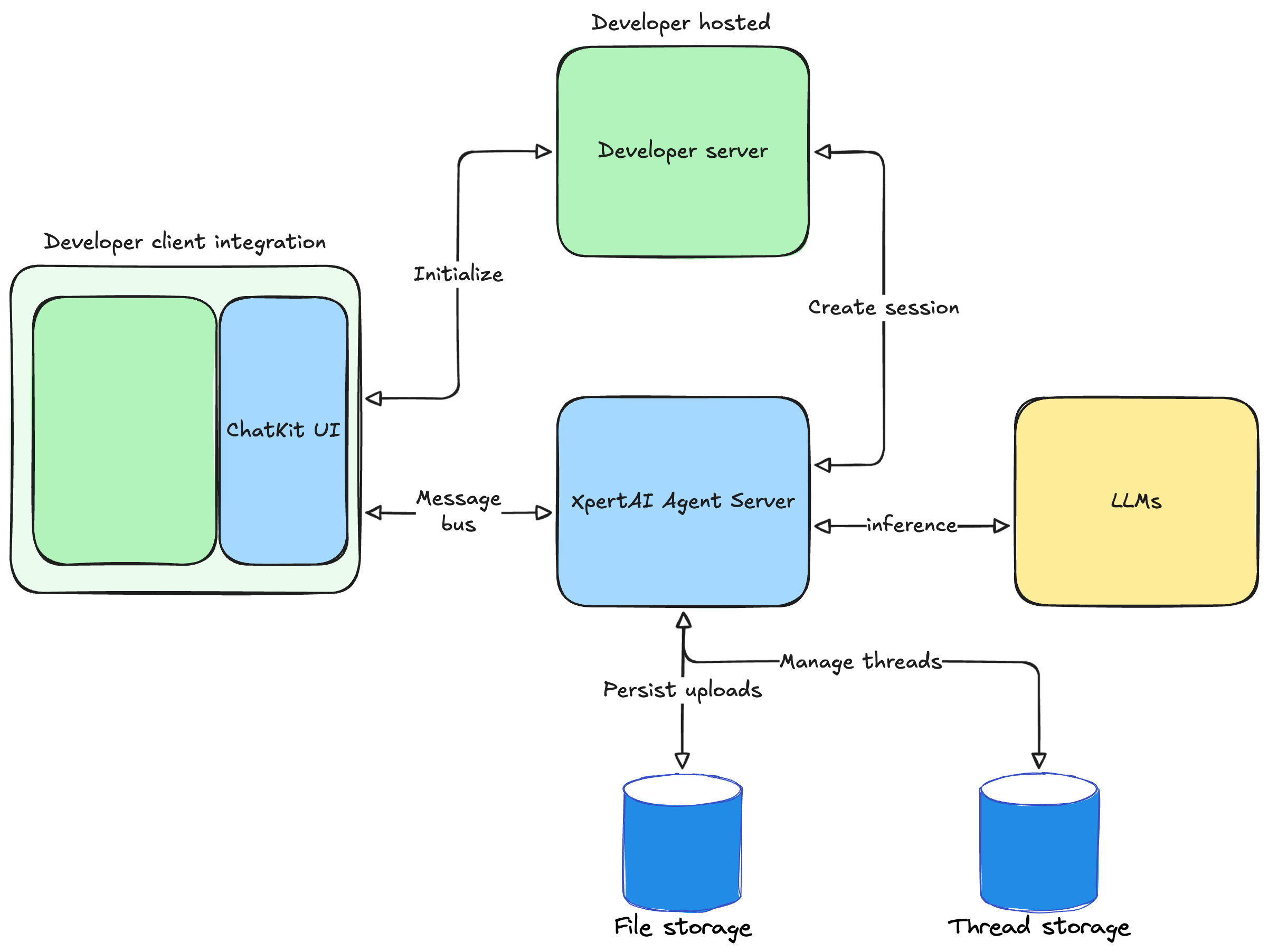
-
Create an agent workflow
Use the Agent Studio to design a multi-step, multi-agent workflow. You will receive an agent (digital expert) ID. The embedded chat in your frontend points to this workflow as the backend. -
Set up ChatKit in your product
You need to create a ChatKit session, expose a backend endpoint that takes your agent ID, exchanges a client secret, and add a script to embed ChatKit in your site.
This code starts a FastAPI service whose only job is to create a new ChatKit session via the XpertAI API and return the session client secret to the frontend:
npm install @xpert-ai/chatkit-react
2.3 Render ChatKit in your UI. This snippet fetches the client secret from your server and mounts a live chat widget connected to your workflow backend.